

The thermostat may be working even when the air conditioner doesn’t respond: a clogged condensate drain can activate a float safety switch and interrupt cooling. If my air conditioner is not responding to the thermostat, set it to “cool” and lower the target temperature at least 3 degrees below the room temperature to check whether it calls for cooling. A blocked drain is one possible cause, but thermostat placement and system overload can also be involved.
It’s frustrating when changing a setting produces no cool air, especially in hot weather. This guide explains how to check the drain line, identify thermostat placement problems, and recognise signs that the AC may be struggling. You’ll also find safe troubleshooting steps and ways to help prevent the problem from returning, so you can tell which checks are simple and when the system needs technical attention.
Key Takeaways
- Set the thermostat to cooling, choose AUTO for the fan, and set the target at least 3 degrees below the room temperature.
- A blank screen may point to weak batteries or a power interruption; check the display and battery compartment before troubleshooting further.
- Thermostat placement matters: nearby windows, doors, or heat sources can distort temperature readings and affect cooling.
- A clogged condensate drain can trigger a safety switch and stop cooling, even when the thermostat appears to be the problem.
- Use safe checks for settings, filters, and breakers, but leave wiring and persistent electrical faults to a qualified technician.
Heat-Wave Check: Thermostat Problem or AC Overload?
Start with the thermostat’s mode, target temperature, fan setting, schedule, and batteries before assuming the AC has failed. In Spain, troubleshooting can expose you to electric shock, short circuits, or fire; don’t open electrical panels or touch wiring, and stop if you see damage or smell burning.
Step 1: Check thermostat mode and temperature
Set the thermostat to Cool, then set the target at least 3 degrees below the room temperature. This gives the system a clear call for cooling. If the display shows heating, off, or a target above the current room temperature, the AC may remain idle correctly. Check the displayed room temperature against how the room feels, then make one adjustment and watch for a response.
Step 2: Review fan settings and schedules
Set the fan to Auto for normal cooling, then review the programmed schedule. In Auto mode, the fan runs as part of the cooling cycle; a continuous fan setting can move air without cooling the room. Check whether an energy-saving schedule or recovery mode changes the target temperature after a period away. If the thermostat was recently switched off, allow its programmed settings to resume before changing several controls.
Step 3: Check thermostat batteries and settings
Check the display and replace weak batteries if the screen is blank, dim, or erratic. Some thermostats connected to the home’s electrical system still use batteries to power the display or controls. After replacing them, confirm that the thermostat is on, set to Cool, and showing the intended temperature. A blank screen can also indicate that the indoor unit has lost power, so batteries may not be the cause.
Step 4: Reset and restart thermostat controls
Turn the thermostat off, wait briefly, then switch it back to cooling and restore the target temperature. This simple restart can clear an incorrect setting without disturbing wiring. If the AC has a built-in delay, allow its 5-minute timer to finish before judging the result. Don’t repeatedly reset a breaker or remove the thermostat faceplate to reach wires; those actions can create electrical hazards.
Next, distinguish a control issue from strain on the AC. If the thermostat calls for cooling but the system keeps running without lowering the room temperature, check for restricted airflow, such as a dirty filter or blocked return grille. A fan that runs while cooling remains weak may mean the AC is struggling, rather than indicate a thermostat setting problem. Stop troubleshooting and contact a technician if a breaker trips again, wiring looks damaged, or you smell burning.
Can a clogged drain line make the thermostat seem like it is not working?
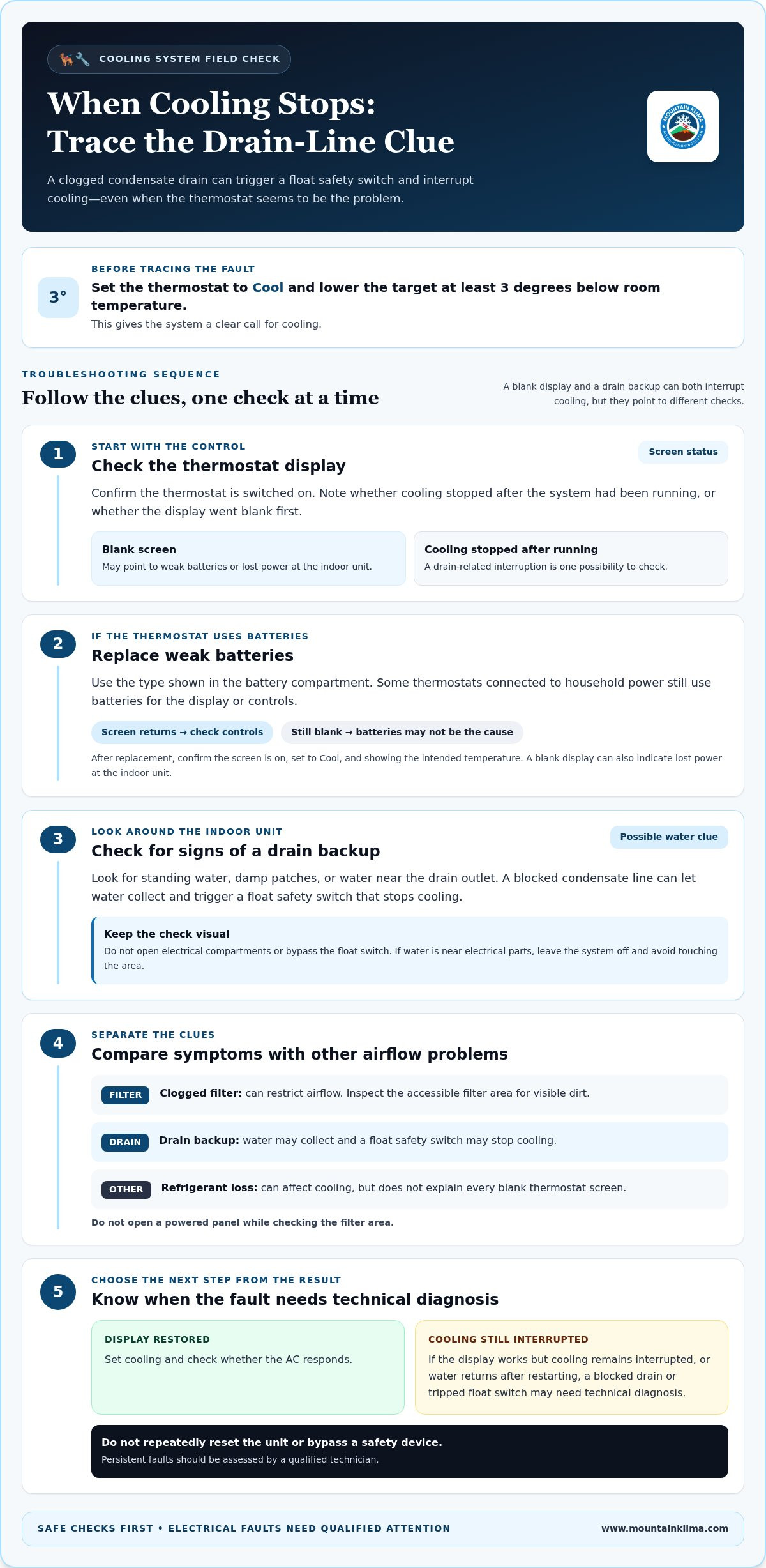
Yes. If the condensate drain backs up, a float safety switch may interrupt cooling and make the thermostat seem unresponsive. Use these checks to distinguish a drain problem from a blank display, weak batteries, or another AC fault.
- Check the thermostat display. If the screen is blank, first confirm the thermostat is switched on. A blank display can indicate weak batteries, but it can also point to lost power at the indoor unit. Note whether the AC stopped after cooling had been running, or whether the display went blank first. That sequence helps separate a control-power issue from a possible drain interruption.
- Replace weak batteries. If your thermostat uses batteries, fit fresh ones of the type shown in its compartment. Some models receive power from the home’s electrical system and still use batteries for their display or controls. After replacement, check whether the screen returns and the buttons respond. If it stays blank, don’t assume batteries were the only cause; an indoor-unit power problem may need attention.
- Look for signs of a clogged drain. Check around the indoor AC unit for standing water, damp patches, or water near the drain outlet. A blocked condensate line can cause water to collect, triggering a float safety switch that stops cooling. Don’t open electrical compartments or bypass the switch. If you see water near electrical parts, leave the system off and avoid touching the area.
- Compare the symptoms with other airflow problems. A clogged filter can restrict airflow, while a drain backup can stop cooling through a safety switch. These faults have different signs: inspect the accessible filter area for visible dirt, but don’t open a powered panel. Refrigerant loss can also affect cooling, but it doesn’t explain every blank thermostat screen. Avoid treating a screen problem as proof of a refrigerant fault.
- Choose the next troubleshooting step. If fresh batteries restore the display, set cooling and check whether the AC responds. If the display works but cooling remains interrupted, or water returns after restarting, a blocked drain or tripped float switch may require technical diagnosis. Don’t repeatedly reset the unit or bypass a safety device. For a persistent fault, arrange air-conditioning repair so the underlying issue can be assessed.
Incorrect thermostat installation or placement
A thermostat may misread the room if its sensor is affected by its surroundings. If my air conditioner is not responding to its thermostat, check that the control is securely installed and away from sources of misleading heat or draughts.
Check thermostat installation
Inspect the thermostat display and mounting without removing the cover. Look for a tilted or loose unit, gaps around the wall plate, or signs that it has been moved. These clues may point to an installation issue, but don’t touch electrical connections or thermostat wiring. If the display works but the AC ignores its settings, note what happens and when.
Review thermostat placement
Compare the thermostat’s location with nearby windows, doors, and heat sources. Direct sun, draughts, a fireplace, or a stovetop can affect its temperature reading and make the AC cycle incorrectly. A common placement recommendation is about 5 feet above the floor. Don’t relocate the thermostat yourself if the work involves electrical connections or wiring changes.
- Check for direct heat or draughts. Stand beside the thermostat and note whether sunlight reaches it during the day. Check whether an open door, window, or nearby heat source changes the air around it. For example, a thermostat on a sunlit wall may sense more heat than the rest of the room and keep calling for cooling.
- Compare the display with the room. Read the displayed temperature and consider whether it reflects conditions in the space. A noticeable mismatch can point to a sensor or placement problem. Don’t use the outdoor temperature as a comparison; the AC responds to the indoor reading. If my air conditioner is not responding to the thermostat, noting this mismatch can help explain the pattern.
- Observe how the AC responds. Set cooling and note whether the indoor system starts while the outdoor unit remains still, or whether neither responds. This difference helps describe the fault, but doesn’t identify its cause. Avoid opening equipment or handling electrical parts while checking the outdoor unit.
- Record changes before arranging repair. Note the display reading, thermostat location, and whether cooling starts at different times of day. Include a concrete example, such as cooling beginning after afternoon sunlight leaves the wall. These details help a technician assess placement, sensor operation, and possible system faults without unsafe electrical troubleshooting.
Why is my air conditioner not responding to the thermostat?
Settings are only one possible cause. A delay, power interruption, safety switch, or electrical fault can also stop the AC from cooling.
- Allow the thermostat delay to finish. Some thermostats use a 5-minute timer before calling for cooling. After changing the setting, wait for that delay rather than switching the controls repeatedly. If the indoor or outdoor unit starts afterward, the pause may have been normal. If nothing happens, note whether the thermostat display remains active and continue with basic checks.
- Check the indoor and outdoor breakers. Turn the thermostat off before looking at the breakers. If an AC breaker is clearly in the OFF position, switch it to ON only if you can do so safely. A tripped breaker or blown fuse can interrupt power to the indoor air handler or outdoor condenser, so either unit may fail to start.
- Stop if the breaker trips again. If it trips immediately after being reset, switch the system off and don’t keep resetting it. Repeated trips can indicate an electrical fault that needs professional investigation. Don’t remove electrical covers, inspect fuses, or touch wiring. A visible damaged wire or burning smell is also a reason to stop troubleshooting.
- Check the air-handler access cover from outside. Some systems have a safety switch that operates when the filter-access cover is open or incorrectly seated. With the system off, check that the cover is closed as designed. Don’t open the panel or reach inside. If the cover is secure but cooling still won’t start, another control or power issue may be involved.
- Notice whether the outdoor unit responds. When cooling is requested, an outdoor fan that stays still, unusual noises, or a unit that never starts can point to an outdoor equipment fault. A thermostat signal alone doesn’t prove the condenser has power. Don’t inspect live electrical components or attempt measurements at the unit; record what you observe instead.
- Leave wiring and control checks to a technician. Loose or corroded wires can interrupt the connection between the thermostat and AC. The thermostat’s low-voltage control signal operates equipment through relays, while the condenser also needs its separate power supply. These electrical checks require suitable tools and training—work that licensed teams like Inlightec Electrical Solutions manage safely. Don’t remove the thermostat or test wires yourself.
- Describe the sequence of symptoms. Record whether the display is blank, the indoor fan runs, or the outdoor unit remains off after the call for cooling. Also note any breaker trip, water near the indoor unit, or recent filter-access opening. These details help distinguish a thermostat issue from a power interruption, safety switch, or equipment fault.
How to troubleshoot an unresponsive air conditioner thermostat step by step
Follow these checks in order, stopping if you find an electrical hazard. They can help distinguish a simple control setting from a fault that needs technical diagnosis.
- Turn the thermostat off before inspecting. Switch it off before checking breakers or the filter area. Keep your hands away from thermostat and AC wiring throughout troubleshooting. A homeowner’s checks should stay external: don’t remove covers, open electrical panels, or reach inside the indoor unit.
- Check the display and settings. Confirm the screen is on and the thermostat calls for cooling. Check the displayed target and schedule, then note whether the indoor fan or outdoor unit responds. If the display is blank, check its batteries only if they’re accessible without opening equipment or handling wiring.
- Inspect the filter area without opening a powered panel. A severely dirty filter can restrict airflow and contribute to safety shutdowns. Turn the thermostat off before looking at an accessible filter. If reaching it requires opening an HVAC access panel, stop rather than removing the cover while power remains connected.
- Look at the breakers from a safe position. With the thermostat off, check the indoor and outdoor AC breakers. If an AC breaker is clearly in the OFF position, switch it to ON once, provided you can do so safely. Don’t remove the electrical panel cover or touch fuses, terminals, or wiring.
- Wait after a breaker reset. After resetting a tripped HVAC breaker, wait 2-3 minutes for the system to restart. Observe whether the indoor unit, outdoor unit, or neither begins running. This short wait lets you see the system’s response without repeatedly changing thermostat settings or interrupting its restart sequence.
- Stop if the breaker trips again. If it trips immediately after resetting, turn the system off and contact an expert. Don’t reset it repeatedly. A recurring trip can signal an electrical problem that needs diagnosis. Also stop if you see damaged wiring near the thermostat or indoor unit, or smell burning.
- Record what the system does. Note the thermostat display, breaker positions, filter condition, and whether either unit starts. Include any water near the indoor unit or unusual sounds from outside. These observations help a technician distinguish a control issue from an airflow, power, or equipment fault.
- Arrange service if basic checks don’t restore cooling. If the thermostat remains unresponsive, avoid further resets and leave wiring untouched. Persistent faults can involve components that require electrical testing or repair. For continued AC problems, arrange air-conditioning repair instead of opening the system yourself.
MountainKlima: Air Conditioner Repair Ducted Air Conditioning Installation
MountainKlima repairs air conditioners when thermostat checks don’t restore cooling or the system keeps stopping. If symptoms point to an electrical control fault, the company also repairs electronic boards. For restricted airflow linked to dirty filters, MountainKlima provides filter cleaning and steam disinfection.
These services are useful when the AC remains unresponsive after safe checks, a breaker trips again, or the outdoor unit won’t start. Don’t open the equipment or handle its wiring. A technician can assess the system and identify the fault that needs repair.
Contact MountainKlima to discuss an air-conditioning problem.
Move from troubleshooting to a lasting repair
If your air conditioner still isn’t responding to its thermostat, avoid repeated resets or attempts to adjust internal controls. The next step is a technical assessment to determine whether the fault lies in the system’s controls or another component. This focuses the response on the actual problem instead of continued trial and error.
MountainKlima repairs air conditioners and electronic boards, and provides filter cleaning and steam disinfection. These services are useful when basic checks haven’t restored operation or the fault requires work inside the system.
Share what you observed and arrange the appropriate next step with MountainKlima’s air-conditioning team. A clear decision now can help you move forward with confidence and get back to a more comfortable indoor space.
Frequently Asked Questions
Can a tripped breaker make the thermostat seem not responsive?
Yes. A tripped breaker can cut power to the indoor unit, leaving a thermostat blank or unable to control cooling. If the display stays on, the thermostat may still respond even though the AC is off. Check the breaker positions without removing the electrical panel cover. If a breaker trips again after being reset, stop and arrange professional diagnosis instead of repeatedly switching it back on.
How do I figure out what's wrong with my air conditioner?
Note what happens when the thermostat calls for cooling: whether the display changes, the indoor fan runs, and the outdoor unit starts. Look for water near the indoor unit, unusual sounds, weak airflow, or a tripped breaker. These observations can help narrow down control, drainage, airflow, or equipment faults. Don’t open the unit or handle wiring to investigate.
How do I fix my AC problem?
Check only issues that are safe to inspect from outside the equipment, such as an incorrect thermostat setting or an accessible dirty filter. If cooling still fails, the cause may involve drainage, a sensor, or an electronic control, each of which needs a different diagnosis. Don’t bypass a safety switch or attempt refrigerant work. MountainKlima repairs persistent air-conditioning faults.
How do I know if the thermostat is bad or if the AC system is the problem?
Compare the thermostat’s response with the equipment’s behaviour. If the display is blank or the buttons don’t respond after you check the power source, the thermostat or its supply may be involved. If the display changes but the indoor or outdoor unit doesn’t start, the fault may lie elsewhere. A technician can safely test the controls and equipment to distinguish these causes; experienced HVAC repair services like hey-key.com can help diagnose and fix underlying equipment issues.
How do I reset my air conditioning unit?
Turn the AC off at the thermostat, then restore cooling after checking the settings. If you reset a tripped HVAC breaker, wait 2-3 minutes for the system to restart. Don’t keep resetting a breaker that trips again, or use an unfamiliar reset button inside the unit. If the system remains unresponsive after this restart, leave it off and arrange diagnosis.
Is it the thermostat, furnace, or AC?
In a typical split air-conditioning system, the thermostat controls the cooling equipment rather than a separate furnace. If the thermostat responds but the indoor unit or outdoor condenser doesn’t, the fault may involve AC power, controls, or components. In homes with separate heating equipment, diagnosing its operation is a different question. Identify which equipment runs, then describe the sequence to a technician.
How should I check thermostat settings, batteries, and wiring when the AC won't turn on?
Check the display, cooling mode, target temperature, schedule, and accessible batteries. Don’t remove the thermostat cover to inspect wiring, pull wires, or test terminals. Electrical connections can be hazardous, and loose or corroded wiring needs professional diagnosis. If the display works but the AC remains off, note what the display shows and how the unit behaves instead of opening the equipment.
How do I reset an air conditioner and thermostat safely?
Turn the thermostat off first. Check its visible settings and accessible batteries, then restore cooling. If a breaker is tripped, reset it only once when safe, then allow 2-3 minutes for the system to restart. Keep covers closed and hands away from wiring. Stop if you smell burning, see damaged cables, or the breaker trips again, and arrange technical service.